Contact form not sending? Find it and fix it
Is the form broken, or the email? How to tell in two minutes, fix the usual causes, and get an alert the next time your contact form stops sending.
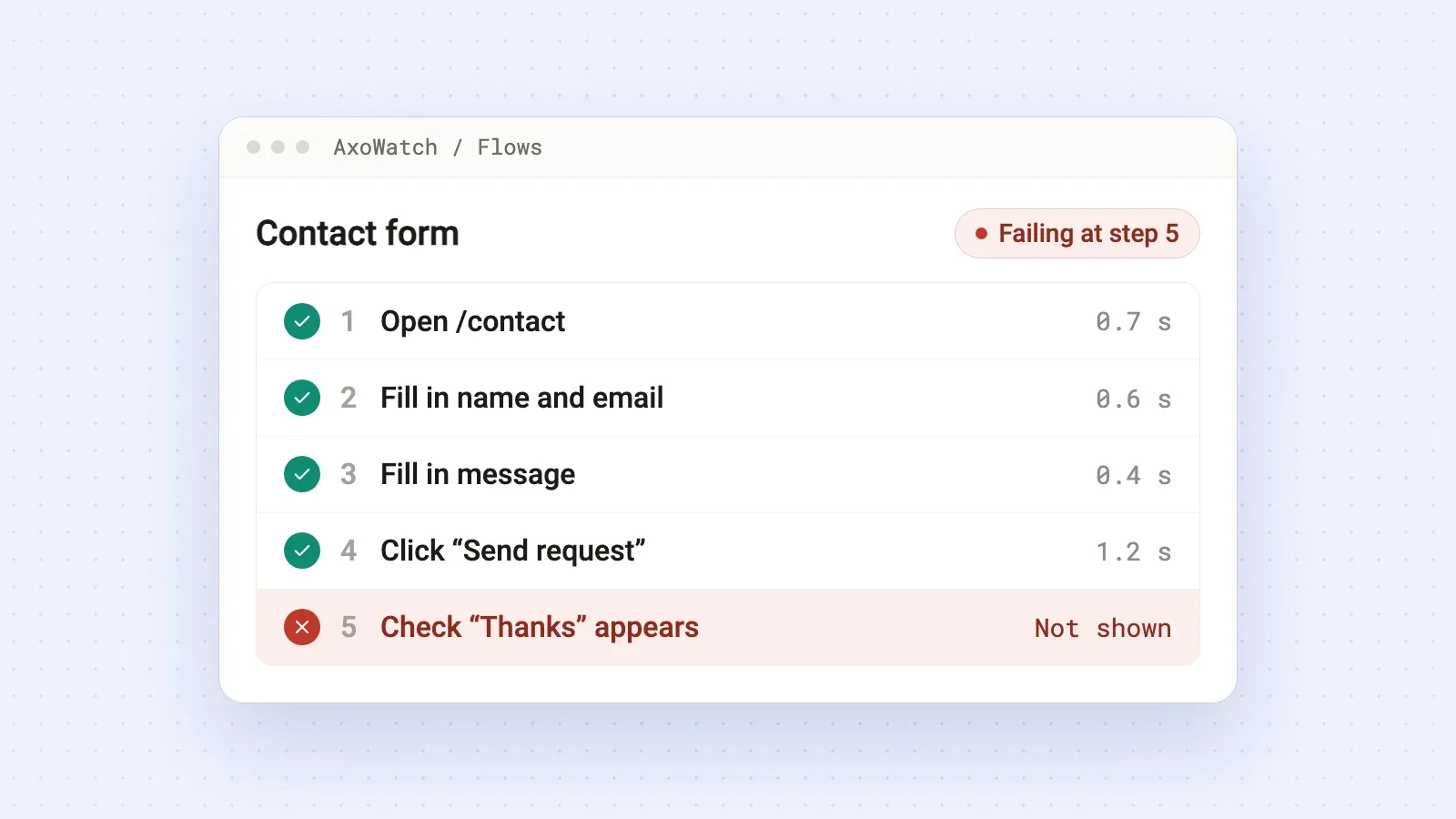
When a contact form stops sending, the cause is usually in one of two places. Either the form never submits (a JavaScript error, a CAPTCHA that blocks people, a server error after an update), or it submits fine and the email never reaches you (no proper mail setup, a missing SPF or DKIM record, a spam filter). Submit the form yourself and watch what happens on the page: that tells you which half to fix. To hear about it next time before a week of leads is gone, have a browser fill in and send the form on a schedule and alert you when the thank-you message doesn't appear.
Step 1: send a test message and watch the page
Open your contact page in a private window, fill in every field and press Send. Then look at what the page does:
- You see the thank-you message. The form works in the browser. The problem is mail delivery, so go to step 3.
- You see an error, or nothing happens at all. The form itself is broken. Go to step 2.
- The button spins forever. Usually the request behind the form fails or times out. Also step 2.
While you're at it, open the browser console (right-click, Inspect, Console). A red error that appears when you press Send is the most useful clue you'll get.
Step 2: the form doesn't submit
The usual reasons:
- A plugin or theme update. On WordPress, an update to the form plugin, the theme or a caching plugin can break the form's script. When the problem started right after an update, roll that plugin back and check again.
- Spam protection: reCAPTCHA or Turnstile keys are tied to domains. Move the site to a new domain, or switch from www to non-www, and the check fails for everyone. A stricter firewall rule can also block real visitors, not only bots.
- A JavaScript error somewhere else on the page. One broken script, for a chat widget or an analytics tag, can stop the code that sends the form. The console shows it.
- The endpoint returns an error. After a deploy or a hosting change, the URL the form posts to answers with a
500or404. In the browser's Network tab, find the request that fires when you press Send and look at its status. - A field the visitor can't fill in: a required field hidden on mobile, or a phone field that rejects valid numbers. Try the form on your phone too.
Step 3: the form submits, but no email arrives
This half is invisible from the page. The form says "Thanks", the visitor leaves happy and the message disappears on the way to your inbox.
- Check spam first, and check whether the message was sent at all: most form plugins keep a log of submissions you can open in the admin.
- Set up real mail sending. On WordPress the default sends mail through the web server, and many inbox providers distrust it. An SMTP plugin connected to a mail service (your email host, or a provider like Postmark, SendGrid or Amazon SES) fixes most of these cases.
- If the form sends "from" the visitor's address, for example a Gmail address, receiving servers often reject it because your server isn't allowed to send for gmail.com. Send from an address on your own domain and put the visitor's address in Reply-To.
- Add SPF and DKIM records for the service that sends your mail, in your domain's DNS. Your mail provider shows the exact records to add.
- Make sure the "to" address still exists. Sometimes the form sends to a mailbox of someone who left, or to an alias that was deleted.
After each change, send another test from a private window and check the inbox.
How to know next time before the leads stop
A broken contact form doesn't take your site down, so uptime monitoring stays green. Nobody complains either. People who couldn't send a message have no reason to tell you. Most site owners notice when they realize the inbox has been quiet for weeks.
The fix is to send the form on a schedule, the way a visitor would. With AxoWatch contact form monitoring:
- Record the form once with the AxoWatch Chrome extension: open the page, fill in the fields with a recognizable test message ("AxoWatch check" in the name, your own email) and press Send.
- End the flow on the thank-you message. That last check is what proves the form went through.
- A real browser repeats it on your live site on a schedule: every 6 hours on Free, every hour on Starter, every 30 minutes on Pro and Agency. If a run fails, AxoWatch runs it again right away and alerts you if it fails twice, with the failed step and a screenshot of every step.
A concrete example. A dental clinic site on WordPress has a "Book a consultation" form. The flow opens /contact, fills in name, email, phone and a short message, presses "Send request" and checks that "Thanks, we'll call you back today" appears. After a plugin update the Send button stops responding. The next run fails at the "Send request" step, the rerun fails too, and the clinic owner gets one Telegram message instead of losing a week of bookings.
Two honest limits. Every run sends a real message, so filter the test messages in your inbox and choose an interval you're fine with. And a browser can't see your inbox: if the page says "Thanks" but the email never arrives, the flow stays green. Keep an eye on whether the test messages keep arriving. If they stop while the runs pass, you know it's mail delivery (step 3 above). If the form is handled by your own app, sending its errors to AxoWatch with the Sentry SDK (error tracking) shows a failed send as an error tied to that run.
Record the form today with a test message you'll recognize, and add the inbox filter right away.
Questions
Why is my contact form not sending emails?
Either the form doesn't submit (a JavaScript error, a CAPTCHA problem, a server error) or it submits and the email is lost on the way (no SMTP setup, a bad sender address, missing SPF or DKIM records). Send a test and watch whether the thank-you message appears to tell which.
How do I fix a WordPress contact form that isn't sending?
Check the form plugin's submission log, then install an SMTP plugin connected to a mail service, send from an address on your own domain and add the SPF and DKIM records your mail provider gives you.
How can I get alerted when my contact form stops working?
Set up a scheduled check that fills in and sends the form in a real browser and confirms the thank-you message. AxoWatch does this and alerts you when the check fails twice in a row.
Will monitoring my contact form send me test emails?
Yes, every full run submits the form. Use a recognizable test name and your own address, filter those messages in your inbox and pick an interval you're comfortable with.
Try it on your site
User Flow Monitoring
Checkout and sign-up, walked like a real visitor.





 I’ll keep an eye on it.
 You
You