Sign-up flow monitoring: know when sign-up breaks
A sign-up page can return 200 OK while nobody can register. What breaks sign-up, how to watch the whole path in a real browser and how to handle test accounts.
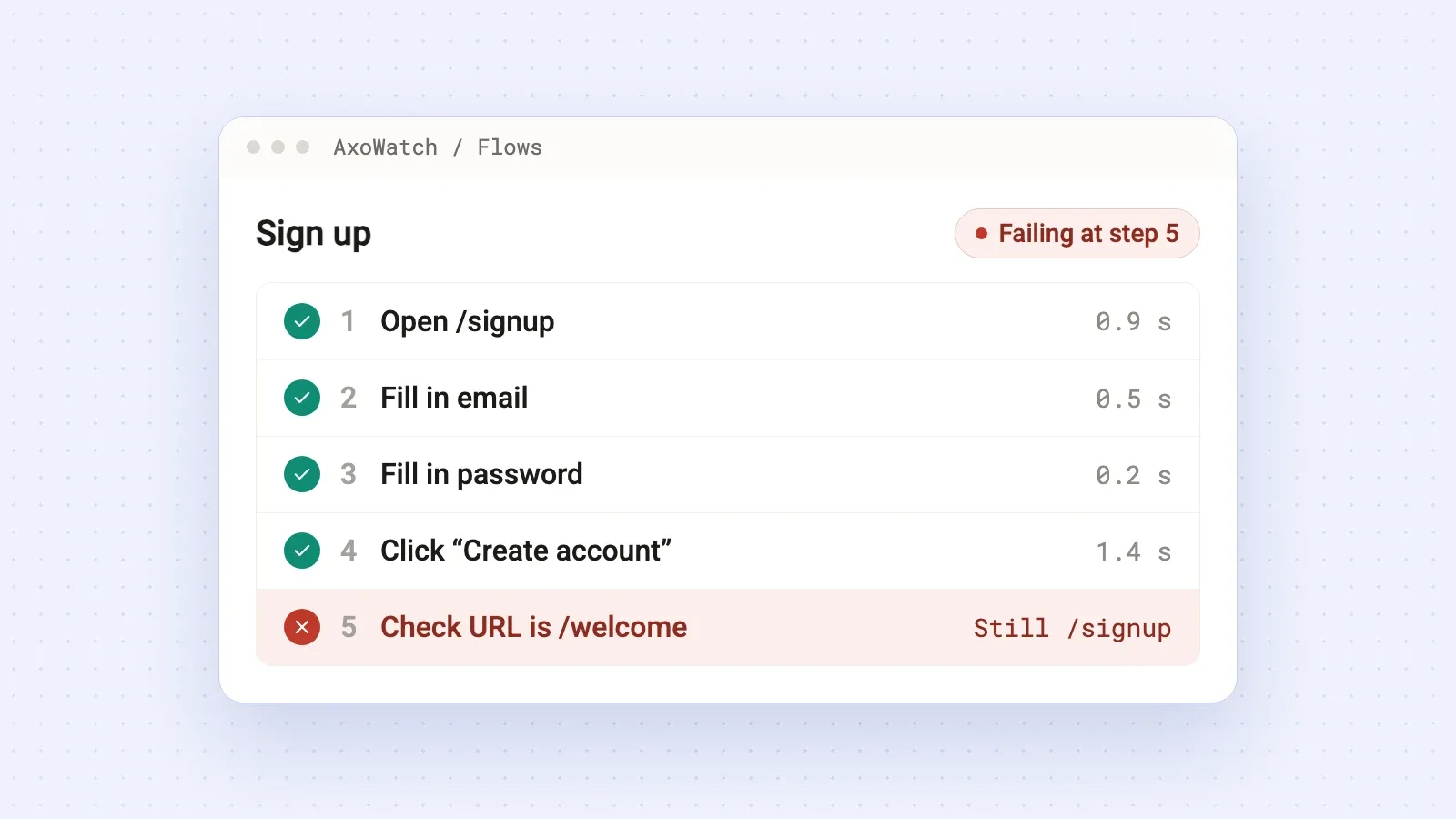
Sign-up flow monitoring means a real browser goes through your registration on a schedule. It opens the page, fills in the form, submits it and checks that the new user lands where they should. If any of those steps fails, you get an alert. An uptime check can't do this: the sign-up page can answer 200 OK while nobody is able to create an account.
Why a broken sign-up is the quietest outage you can have
When checkout breaks, at least some customers write to you. When sign-up breaks, almost nobody does. The people who hit the problem aren't your users yet. They have no account, no support channel and no reason to try twice, so they close the tab.
What you see instead is a slow, confusing drop in trials. Ads keep spending and stop converting. By the time someone opens the funnel report, sign-up may have been broken for days.
What actually breaks a sign-up
Most of these failures don't take the site down. They break one step:
- A JavaScript error in the form script. The "Create account" button does nothing, and the page still loads fine.
- New validation rules. A stricter password policy, a required field that's hidden on mobile, a phone field that rejects valid numbers. The visitor sees an error and leaves.
- The registration request fails. After a deploy or a migration the endpoint returns a
500, the form spins for a while and then says "Something went wrong". - Bot protection that's too strict. A CAPTCHA or firewall rule meant for bots starts blocking people too.
- A broken redirect after sign-up. The account gets created, but the welcome screen errors out. The user is in, and stuck.
- A redesign. "Sign up" becomes "Get started", or a field moves to a second step. The server is fine. The path is broken.
Your uptime monitor stays green through every one of them.
Check the whole path, end to end
To catch these, go through sign-up the way a visitor does:
- Open the sign-up page.
- Fill in every field a visitor has to fill in.
- Submit the form.
- Check that the next screen actually shows up: the welcome page, onboarding or the dashboard.
Step 4 is the one people skip, and it matters most. A check that stops at "the form is on the page" misses half of the failures above. Sign-up only works if a new user ends up inside your product.
What to do about test accounts
Every full run creates an account, and most apps won't register the same email twice. Pick one of two setups before you start.
Reserve a test address and clean it up. Ask your developers to treat one test email, or a whole test domain, differently. For example, delete that account automatically every night, or skip the "email already taken" check for it. Then the full path, account creation included, can run on a schedule.
Split the path in two. Monitor sign-up up to the moment before the final submit (the page, the form, validation), and monitor login and onboarding with a test account that already exists. This way you won't see the final "create account" call fail, but error tracking will catch it. More on that below.
Either way, use test data. Never a real customer's email.
Setting it up in AxoWatch
With AxoWatch user flow monitoring you don't write test code.
- Record the path once. Open your site with the AxoWatch Chrome extension, press Record and sign up the way a new user would. Each click and field becomes a step. Password fields aren't recorded, so you add the password in the app.
- Pick how often it runs. A real browser repeats the path on a schedule, and the interval depends on your plan (see pricing).
- Get alerts only for real breakages. One failed run isn't an alert. AxoWatch runs the flow again right away and notifies you only if it fails a second time. You get one message when it breaks and one when it passes again, in Telegram, Slack, email, Microsoft Teams or a webhook.
When a step fails, you see which one it was, a screenshot after every step and how long each step took. If your app also sends errors to AxoWatch through the Sentry SDK, the error from that run is attached to that exact step. "Submit failed" plus 500: duplicate key value violates unique constraint on the same step is a bug report your developer (or your AI coding agent) can fix in minutes.
After sign-up
The same approach works for every path that brings in users or money: login, password reset, contact and lead forms, booking, checkout. If you sell online, read why checkout breaks silently next.
Start with the one path your business can't live without. For most SaaS products that's sign-up.
Questions
What is sign-up flow monitoring?
A real browser goes through your registration on a schedule: it opens the sign-up page, fills in the form, submits it and checks that the next screen appears. If any step fails, you get an alert with the step that broke.
Can uptime monitoring catch a broken sign-up?
No. Uptime monitoring checks that a page answers. The sign-up page can return 200 OK while the button does nothing, the form shows an error or the registration request fails.
Will a monitored sign-up create real accounts?
It creates an account each time the full path runs. Use a test email that your app cleans up automatically, or monitor the form up to the final submit and check login with an existing test account.
Do I need to write Playwright or Selenium tests?
Not with AxoWatch. You click through sign-up once with the Chrome extension, and the recording becomes the check.
Try it on your site
User Flow Monitoring
Checkout and sign-up, walked like a real visitor.





 I’ll keep an eye on it.
 You
You